
Designing a Modular Training System for Complex Decision-Making
Design Focus: Making complex decisions learnable through structured interaction loops, clear system state, and immediate feedback.
Impact: Enabled scenario-based training used by hundreds of soldiers, supporting both classroom instruction and independent practice.
Summary
WIT FORCE is an interactive training system designed to extend the U.S. Army’s Weapons Intelligence Course.
I redesigned the experience from a video-based curriculum into a scenario-driven system where users make decisions, receive feedback, and improve through repeated practice.
The challenge was translating a dense, instructor-led program into something usable, scalable, and effective—within tight technical and production constraints.
Design Focus
Users needed to make decisions with incomplete information and understand the consequences of those decisions
I focused on making outcomes visible—using feedback and progression to help users see what worked, what didn’t, and how to improve over time.
A key focus was making system state and outcomes legible at every step, so users could understand what happened, why it happened, and how to improve.
Context
The Weapons Intelligence School trains soldiers to investigate incidents, analyze evidence, and identify threats in operational environments—essentially “CSI on the battlefield.”
The existing curriculum was dense, multi-disciplinary, and heavily instructor-led, making it difficult to practice outside the classroom.
The goal was to improve engagement and retention, enable self-directed training, and reduce reliance on in-person instruction through scenario-based learning.
Core Challenge
Users needed to move through multi-step decision systems—interviewing subjects, analyzing evidence, and reconstructing events—often under pressure and with incomplete information.
The system had to support this while staying true to real-world procedures, work within tight production constraints, and remain usable across a wide range of technical skill levels.
Constraints & Environment
This project operated under several constraints that directly shaped the design:
- Technical: Built within an existing video-based platform
- Compliance: Deployed in restricted military environments
- User variability: Wide range of computer literacy
- Production: Dependent on external film production timelines
- Team size: Small, cross-functional team
- Delivery: Fixed timeline tied to curriculum cycles
These constraints meant the solution had to be practical, not ideal.
My Role
I led the interaction design, working closely with subject matter experts and engineers to translate real-world training into a system users could move through and learn from.
My focus was structuring decisions, feedback, and progression in a way that made complex scenarios understandable and repeatable.
Approach
The system was designed as a set of reusable interaction patterns built around decision-making, feedback, and progression.
I focused on structuring the system so it could support different types of training while staying simple enough to build and use within constraints.
1. Modular System Design
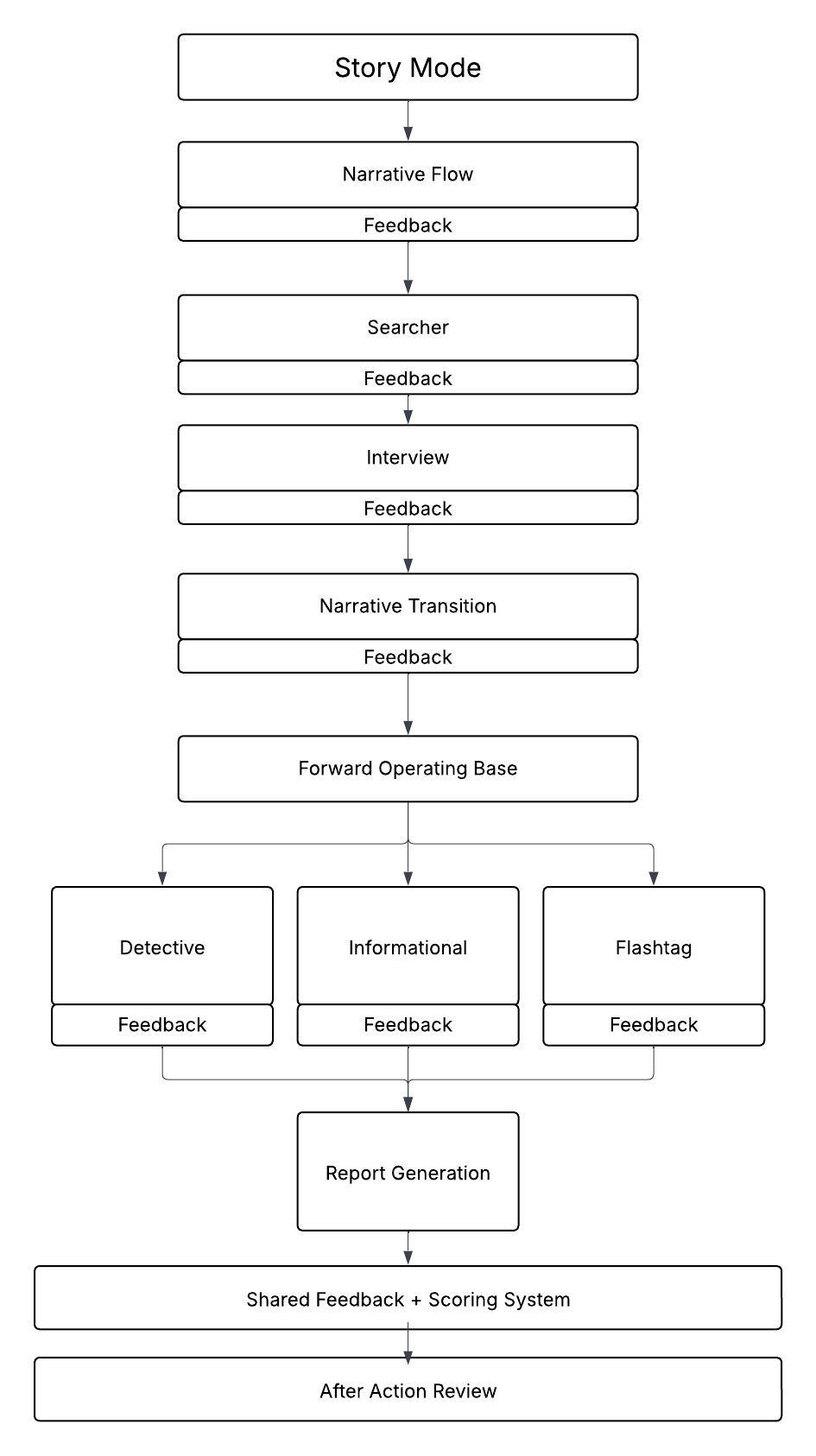
The system is designed so users improve through repeated decisions, feedback, and iteration—mirroring how skills are built over time rather than taught passively.
I structured the system as a set of reusable modules that could support both guided scenarios (Story Mode) and focused practice (Drill Mode).
Each module could function on its own or as part of a larger experience, allowing the same interaction patterns to scale across different types of training.
This made it easier to create new content and adapt the system to different learning contexts without redesigning the core experience.
2. Core Interaction Loop
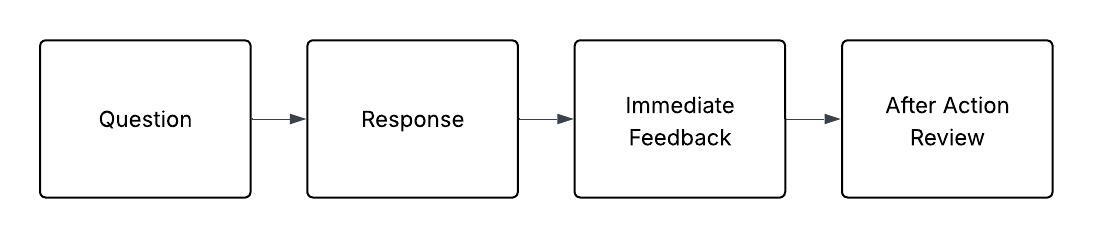
Each scenario is structured around a repeatable decision loop:
users observe, make a decision, see the outcome, and review feedback before continuing.
This creates a loop of observe → decide → feedback → adjust, allowing users to iterate and improve through repeated interaction.
Scenarios increase in complexity over time, requiring users to apply learned patterns in less predictable situations.
3. Selective Fidelity & Abstraction
A key decision was determining what needed to be interactive and what didn’t.
High-value behaviors were made interactive, while lower-impact tasks were handled through narrative or simplified interactions. This kept the system focused and avoided unnecessary complexity.
Examples:
- Complex tools were simplified into usable interactions
- Lower-impact tasks were embedded into the narrative
- High-value decisions were built into interactive modules
This kept development manageable while focusing effort on the parts of training that mattered most.
Key Design Decisions
Choosing Video + Interaction over Full 3D
We chose not to build a fully 3D environment.
A full simulation would have added cost and complexity, and risked breaking realism due to limited fidelity. It also didn’t match how users were already trained.
Instead, we used filmed video combined with interactive decision points.
This created a more believable experience while keeping the system accessible and feasible to build.
Designing for Mixed User Experience Levels
Users ranged from non-technical to experienced.
To support this range, interactions were kept simple by default, with optional depth where needed. Guided flows helped reduce friction, while more advanced interactions were available without being required.
Structuring the System for Ongoing Content
The system was built so scenarios could be updated and expanded without reworking the core experience.
Content could be added, adjusted, or reused across modules, making it easier to scale training over time without heavy engineering involvement.
Focusing Effort Where It Matters
Not everything needed to be fully simulated.
For example:
- A specialized camera system was simplified to focus on key learning moments
- Reconstruction tasks were structured into guided workflows rather than open-ended systems
This kept development focused on the parts of training that had the most impact.
Interaction Model
Each scenario follows a structured interaction loop:
- Scenario setup (video)
- Decision or interaction
- Investigation or task
- Analysis and synthesis
- Outcome and immediate feedback
- After-action review
Each step communicates system state clearly, ensuring users understand progress, outcomes, and next actions.
This structure reinforces learning through repetition, connects decisions to outcomes, and creates a clear sense of progression.
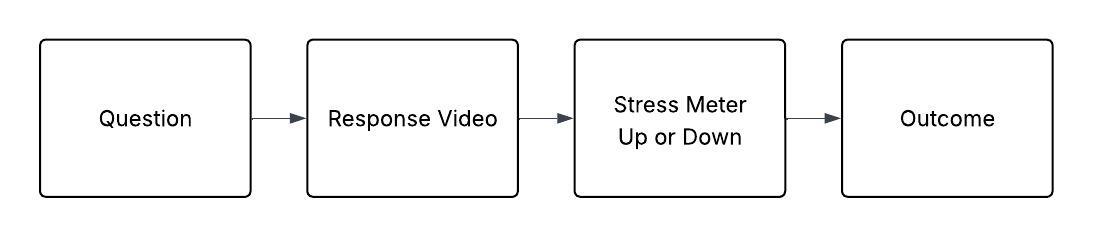
Example Systems
Each system represents a different interaction pattern within the overall decision loop and is focused on a different type of interaction:
Interview System (Behavioral Interaction)
- branching dialogue
- stress-based failure conditions
- visible emotional feedback
Reconstruction System (Analytical Thinking)
- identification and classification
- object combination
- structured schematic selection
Search & Discovery (Spatial Awareness)
- environmental scanning
- tool selection
- evidence collection
Recognition & Recall (Pattern Matching)
- rapid identification tasks
- immediate validation feedback
Tradeoffs & Design Tensions
Several tradeoffs shaped the system:
- realism vs usability
- simulation vs abstraction
- engagement vs accuracy
- scope vs delivery timeline
For example:
Branching dialogue was limited to key decision points to control complexity and keep scenarios replayable.
Interaction models were kept simple by default, with added depth only where it improved learning.
3D elements were used selectively, only where spatial understanding was critical.
Outcomes
The system enabled users to practice complex decision-making outside of the classroom, with clear feedback on their performance.
By making outcomes visible and repeatable, users could identify gaps, adjust their approach, and improve through repeated interaction loops.
The platform supported scalable training used by hundreds of soldiers across both classroom and independent environments.
Reflection
This project reinforced the importance of designing for behavior, not just content.
Rather than recreating reality in full detail, the system focused on the decisions that matter—structuring interaction, feedback, and progression so users could practice, fail, and improve in a controlled environment.