
Designing a Mobile Training System for Real-World Decision Making Under Compliance Constraints
Design Focus: Guiding real-world decisions through scenario-based interactions, immediate feedback, and clear consequences.
Impact: Used to train ~10,000 Colorado law enforcement officers under new legislative requirements.
At a glance
- Mobile-first training system designed for law enforcement
- Replaced static content with interactive, scenario-based challenges
- Built feedback into each decision to reinforce real-world judgment
- Re-architected a legacy Flash system into a modern HTML/CSS platform
- Focused on behavior and decision-making, not points or rewards
The result is a scalable training system that uses game design principles to improve real-world decision-making under pressure.
Summary
This project involved designing a mobile-first training system to help law enforcement officers navigate real-world animal encounter scenarios under new legislative requirements.
Rather than relying on points, badges, or leaderboards, the system is built around decisions, consequences, and feedback—allowing users to practice judgment in realistic situations.
The product was designed for field use, where officers could complete training between calls. This required fast interactions, minimal friction, and reliable mobile performance.
Context
In 2013, Colorado Senate Bill 13-226 mandated additional training for law enforcement officers encountering dogs in the field.
A taskforce of law enforcement, animal behavior experts, legal advisors, and training professionals was formed to define a statewide approach.
The need wasn’t just for content—departments required an interactive training system they could deploy independently to meet compliance standards.
The Core Challenge
The challenge was translating diverse—and sometimes conflicting—stakeholder perspectives into a system that:
- met legislative requirements
- reflected real-world conditions in the field
- scaled across departments
- could be deployed within strict government IT environments
Constraints & Environment
The project operated under a mix of regulatory, technical, and organizational constraints:
- Legislative compliance requirements
- Stakeholder disagreement on best practices
- Government IT deployment restrictions
- Limited development resources
- Long-term maintainability concerns
As one taskforce member put it:
“There is a big difference between a dog that is barking and one that poses an imminent danger of attack.”
Members of the taskforce brought different constraints and pressures to the table. While officers agreed on the value of safer outcomes, they were also mindful of the time and resource burden additional training would place on their departments. The system needed to be practical, defensible, and simple enough to earn adoption — not just satisfy legislation.
Stakeholders agreed on the importance of safer outcomes, but were also sensitive to the time and resource burden additional training would place on departments.
The system needed to be practical, defensible, and simple enough to adopt—not just compliant.
Technical Constraints
At the time, many government environments required strict software approval.
Adobe Flash was already approved within these systems, which allowed the training to be deployed without lengthy security reviews.
As a result, the system was built in Flash/Flex with an XML-driven content structure—prioritizing deployability and adoption over long-term flexibility.
My Role
I worked closely with the lead engineer and a multidisciplinary taskforce to design the training experience end-to-end.
My responsibilities included:
- Turning stakeholder input into a clear course structure
- Designing interaction patterns within an XML-driven system
- Defining how users move through scenarios and track progress
- Ensuring the system could run independently across departments
The work was highly collaborative, but my focus was translating complex—and sometimes conflicting—requirements into something officers could move through and complete without instructor support.
Key Design Decisions
1. Built training around reusable interaction systems
Instead of static, slide-based content, the course was structured around repeatable interaction types—scenario decisions, matching exercises, hotspot analysis, and video-driven branching. These were defined within XML, allowing consistent behavior across modules and making updates easier over time.
2. Translated stakeholder input into consistent interaction logic
Stakeholders had differing opinions about best practices in the field. Through working sessions and synthesis, I translated those discussions into standardized interaction patterns that could be taught consistently and held up under scrutiny.
3. Designed for independent deployment
The system needed to function without instructor facilitation. I built in clear progression, decision feedback, and completion tracking so departments could run training independently and demonstrate compliance when required.

Revised HTML-based training interface showing modular interaction patterns and progression structure.
Tradeoffs & Design Tensions
Several constraints shaped the system:
Legal Precision vs Usability
Content needed to remain legally defensible while still reflecting realistic field conditions.
Stakeholder Alignment vs Delivery Timeline
Building consensus required iteration, but the system still had to be delivered within mandated timelines.
Platform Constraints vs Longevity
Flash enabled immediate deployment within government systems, but was not a long-term solution—and eventually required a full rebuild.
Interaction Model
The system was designed to support real-world decision-making through immediate feedback on user choices.
Because officers completed training independently, the experience needed:
- clear onboarding and access states
- visible progress and completion status
- structured challenges with evaluation and feedback
I mapped key transitions—invitation, registration, login, and module selection—and designed the system so users always understood where they were and what to do next, while administrators could reliably track completion.
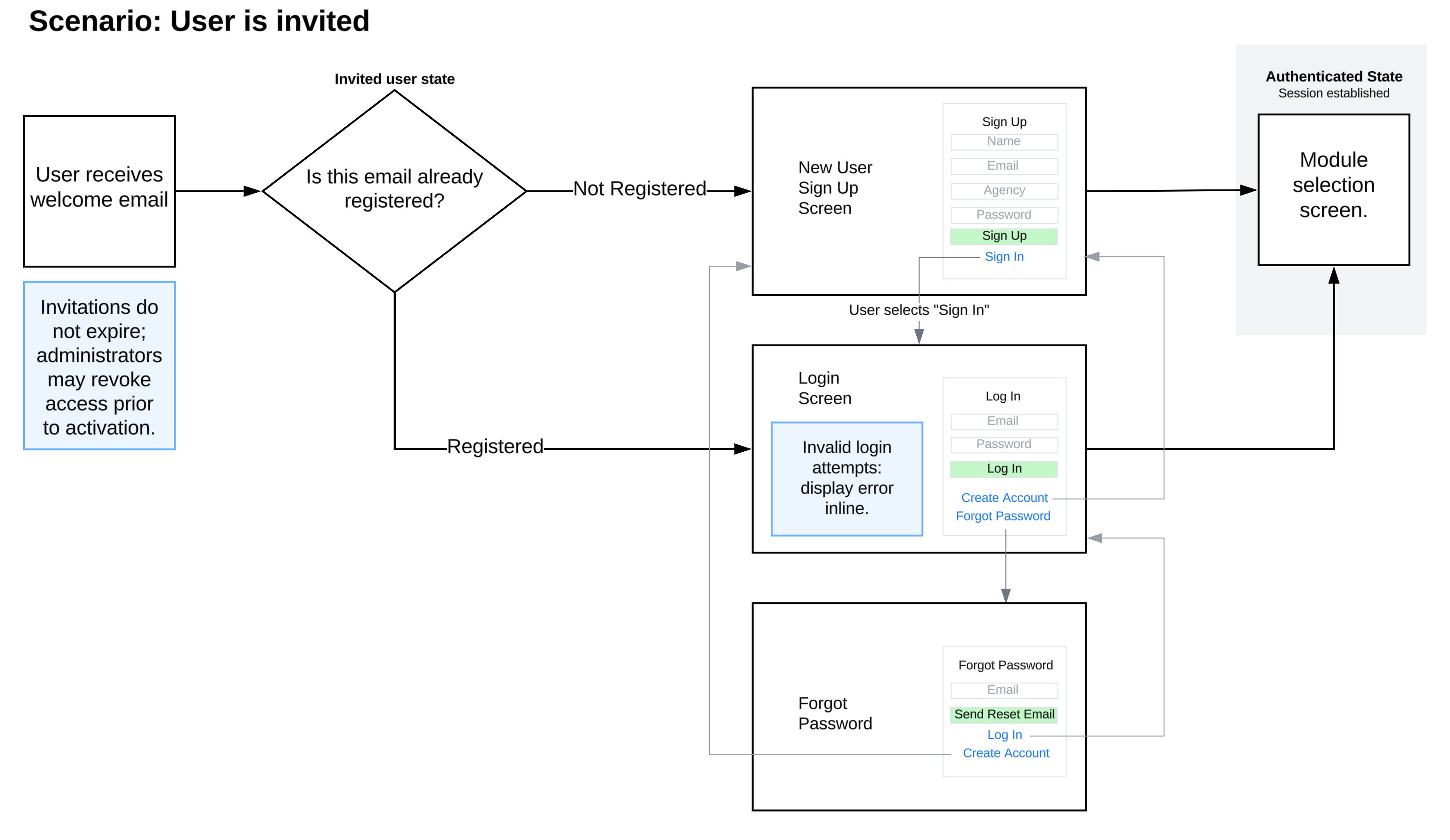
Invitation and authentication flow modeling access states and administrative control.

Early wireframe exploring feedback visibility, scoring, and progression within challenge and evaluation.
Platform Migration & System Evolution
When Flash was deprecated and the original hosting contract expired, the system was brought in-house to maintain statewide continuity.
I partnered with the lead engineer to translate the XML-driven course architecture into HTML/CSS, preserving the learning structure while modernizing the interface.
As departments continued using the system, limitations in the original architecture became more visible—particularly in how identity and administration were handled.
For example:
- Admin accounts were tied directly to email addresses as primary identifiers
- Personnel changes required manual updates
- Certificate generation exposed reliability issues in the system
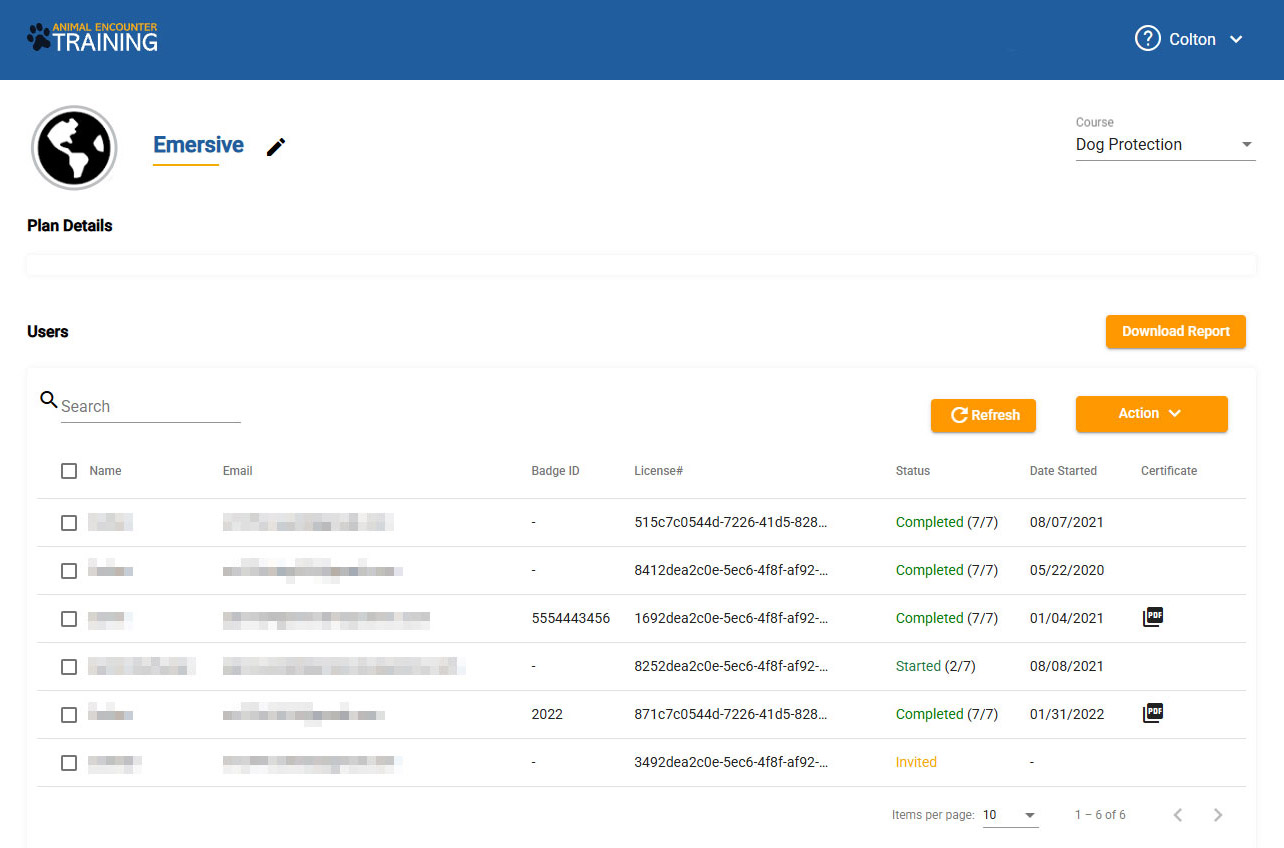
Administrative dashboard introduced during the HTML migration, used to manage users, track completion, and generate certificates.
Reflection
Working through these challenges changed how I think about system design.
It’s not enough to design for launch—you have to design for turnover, policy changes, and long-term maintenance.
Working through those issues changed how I think about identity and administrative systems. It’s not enough to design for launch — you have to design for personnel turnover, policy shifts, and long-term maintenance.
Game Design Approach
While not a traditional game, the system applies core game design principles:
- The officer acts as the player
- A repeatable loop of observe → decide → act → feedback
- Failure is safe and instructive
- Difficulty increases over time
- Engagement comes from interaction, not rewards
Gamification Strategy
Gamification Through Interaction
No points. No badges. Just better decisions under pressure.

I utilized a system that drives behavior through interaction, feedback, and repetition—without relying on points, badges, or extrinsic rewards. Instead, I crafted engagement though different designs:
- Officers reviewed real-world environments and identified signs of a potential dog presence under time constraints
- Users interacted directly with scenes—similar to investigative or hidden-object gameplay
- Each decision produced immediate feedback: correct identifications, missed signals, and false positives
Difficulty increased over time, reinforcing pattern recognition through repeated exposure.
Mobile-First Evolution
The system was designed for real-world use—officers could complete training between calls, in vehicles, or during downtime.
The original Flash-based system limited mobile access, so we rebuilt the platform using HTML/CSS.
This enabled:
- Short, on-demand training sessions
- Reliable use in the field
- Broader access across departments and devices
The shift moved the system from a desktop training tool to something officers could use in real-world situations.
Outcomes
- Deployed statewide to support compliance with SB 13-226
- Enabled departments to independently meet mandated training requirements
- Preserved continuity of training through platform migration
- Continues to be used to train officers across Colorado
System Evolution
The system has continued to evolve as long-term usage exposed limitations in the original architecture.
Recent improvements include:
- Decoupling identity from email-based primary keys
- Improving certificate generation reliability
- Simplifying administrative workflows to better handle personnel changes
This work is focused on making the system more resilient and adaptable over time, while maintaining continuity for existing users.